TalentCraft
AI Content Creation Tool for eFront and TalentLMS
TalentCraft – Your AI for Quick Course Creation in your LMS
With TalentCraft, the AI-powered content creation tool in TalentLMS and eFront, you can create high-quality training content for your Learning Management System (LMS) in record time. Whether you need complete course structures, engaging visuals, clear step-by-step instructions, or interactive quizzes, TalentCraft makes it possible.
Cover Every Training Need with a Single AI Tool in Your LMS
Stop struggling with creating impactful learning content. TalentCraft helps you generate the right content every time. Create rich learning materials, tailor them to your brand, and launch comprehensive training programs and courses that help your learners achieve their goals-and go beyond them.
How TalentCraft Supports Course Creation
With TalentCraft, you can create complete course structures in just a few clicks—from modules and written content to visual elements. The tool automatically generates matching images and graphics, eliminating the need for time-consuming image searches. Complex topics are transformed into easy-to-follow step-by-step guides, while automatically generated multiple-choice questions help assess your learners’ knowledge effectively.
1. Start from scratch – Build your courses entirely from the ground up.
2. Import from a Document – Turn your existing content into complete courses.
- 3. Generate with AI – Let AI create course content for you.
4. Use Templates – Start instantly with a pre-built course structure.
Guide your employees through the processes they need to follow. Create step-by-step instructions manually or upload your own files-eFront automatically converts them into structured guides and complete learning courses.
Assess your learners’ knowledge with a single click. TalentCraft’s AI-powered assessment generator creates multiple-choice questions directly from your existing course content.
From the prompt to the finished course
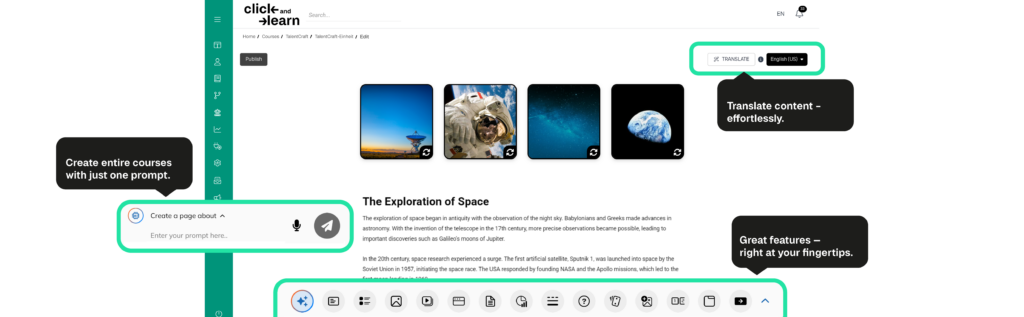
Create and Edit Content with Ease
Create and edit e-learning courses intuitively, without unnecessary complications. The clear, user-friendly interface helps you keep track of your content at all times – on desktop, tablet, and smartphone.
Deliver Projects on Time
Don’t start from scratch. Use practical templates, let TalentCraft fill in the details, and launch your training program on schedule.
Develop Learners Faster
Identify skill gaps and close them quickly. Equip your team with training that goes beyond basic background knowledge and builds practical competencies.
Protect Your Budget—Without Compromise
Save both time and money. Free up valuable resources, streamline course creation, and benefit from a fairly priced enterprise LMS.
How TalentCraft Supports Your Course Creation
From the initial idea to the finished course, TalentCraft guides you through the entire creation process.
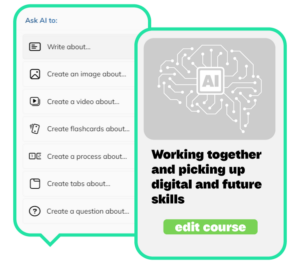
Create
Turn a few keywords into complete course structures, lessons, and relevant learning content—quickly and with AI support.
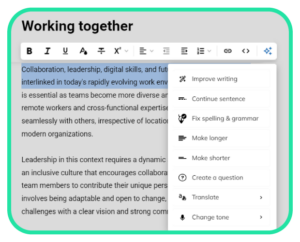
Refine
Optimize, expand, or translate your content, and tailor its tone and scope to your target audience.
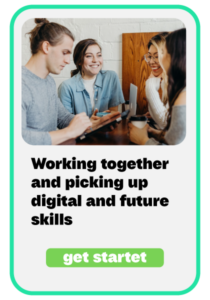
Launch
Review the generated content and make the finished course directly available to your learners in TalentLMS or eFront.
TalentCraft FAQs
Is content created with TalentCraft tied to a specific LMS?
Yes. Content created with TalentCraft is designed for use within TalentLMS or eFront. Exporting it to other learning platforms is not currently supported.
How many courses can be created with TalentCraft?
TalentCraft allows you to create an unlimited amount of course content. The availability of individual AI features depends on the selected TalentLMS plan.
How can I access TalentCraft?
TalentCraft is available with the Pro and Enterprise TalentLMS plans, as well as during the 14-day premium trial. The feature must be enabled in the relevant portal.
Who can use TalentCraft?
TalentCraft can be used by users who have permission to create or edit course content in TalentLMS or eFront. Access is managed through the roles and permissions configured in the portal.
Do I need technical expertise to use TalentCraft?
No. TalentCraft is designed to enable users to create professional course content without technical or design experience. Providing a clear and specific prompt helps the AI generate more relevant results.
How long does it take to create a course with TalentCraft?
This depends on the scope and depth of the course. According to TalentLMS, simple courses can be created in less than an hour, while more extensive courses generally take several hours.
What types of content can TalentCraft create?
TalentCraft supports the creation of complete courses, lessons, written content, quiz questions, flashcards, images, diagrams, and interactive learning content. All generated content can subsequently be edited and customised.
Can TalentCraft create complete courses?
Yes. Based on a topic or a short description, TalentCraft can generate complete course sections and relevant learning content. The results can then be reviewed, adjusted, and published in the course editor.
Can content created with TalentCraft be edited afterwards?
Yes. Text, images, and interactive elements can be edited at any time. TalentCraft provides suggestions, while the final selection, review, and approval remain the responsibility of the course creator.
Can TalentCraft improve existing text?
Yes. TalentCraft can correct spelling and grammar, continue or revise existing text, and make it shorter or more detailed. The tone of voice can also be adjusted to make the content professional, friendly, direct, confident, or informal.
Does TalentCraft support multiple languages?
Yes. TalentCraft supports translations into 15 languages. This allows existing content to be adapted more quickly for different audiences and international teams.
Can TalentCraft automatically create questions and assessments?
Yes. TalentCraft can automatically generate questions and assessments based on existing course sections. The generated questions should be reviewed for accuracy and adjusted where necessary before publication.
Can TalentCraft create images and diagrams?
Yes. TalentCraft can generate AI-powered images and refine them based on your requirements. Numerical information can also be visualised as diagrams and added directly to a course.
Should AI-generated content be reviewed before publication?
Yes. AI-generated content should always be reviewed for factual accuracy, relevance, clarity, and suitability for the intended audience. Final responsibility for approving and publishing the content lies with the course creator.
How is TalentCraft different from general-purpose AI writing tools?
General-purpose AI tools usually generate individual texts or ideas that must then be transferred manually into a separate authoring tool. TalentCraft integrates AI-powered content creation directly into the course creation, editing, publishing, and management process within TalentLMS and eFront.
What other AI-powered features does TalentLMS offer?
In addition to TalentCraft, TalentLMS offers further AI-powered features, including content extraction from documents, translations, assessments, skills, and the Learning Coach. The available features depend on the selected subscription plan.
How can the AI test generator be used in eFront?
Open the Generate AI Test feature within a course lesson, select the content you want to use, consent to the required data transfer, and start the generation process.